


 Author:


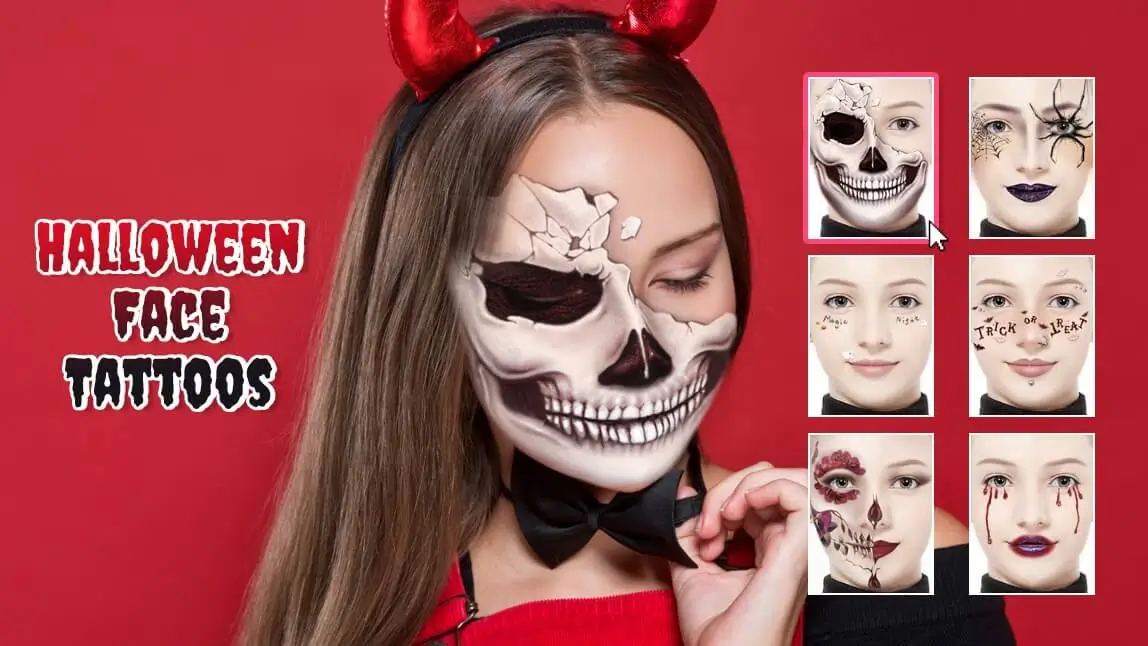
Still deciding on the perfect Halloween makeup to slay Halloween 2026? Explore these makeup ideas that are sure to give everyone goosebumps in YouCam Makeup!

With a diverse range of Halloween makeup styles, including skull tattoos, spider web tattoos, and bat tattoos, YouCam Makeup is your go-to destination for achieving the perfect Halloween look.
In this blog, we'll dive into the world of Halloween makeup, highlighting the spine-tingling skull designs, the creepy crawlies like spiders, and bats, and provide you with a step-by-step guide on how to use the best Halloween face filter app YouCam Makeup to achieve the ultimate Halloween makeup look. Plus, see the newest AI Halloween character trend below thats making the rounds this month.
"The AI functions are better than any website AI apps i tried. I have genuinely found this app to be very enjoyable and enhancing my art work and the creative process and experience." — tehstev88, App Store review (★★★★★)
Best Free App For Halloween Face Filters in 2026
YouCam Makeup is the best Halloween face filter app in 2026 for Android and iPhone. Discover various styles, such as:
- Sugar Skull Face Filters
- Skeleton Face Filters
- Spider Web Face Filters
- Bat Face Filters
- Pumpkin Face Filters
1. Best Skull Face Filters


When it comes to Halloween, the skull is an iconic symbol that exudes an aura of spookiness.
Adding a skull face filter look can take your photo to the next level.
Whether you opt for a delicate and glitter skull design or go for a spooky and creepy skull transformation, YouCam Makeup has a range of skull face filters to suit your style.
These skull makeup can bring an air of eeriness to your Halloween look that is sure send shivers down spines.

👉 See more: YouCam Makeup's skull face tattoo filters
2. Best Spider Web Face Filters & Bat Face Filters


For those who prefer a more spine-tingling approach to Halloween, spider web and bat makeup are the way to go! A black widow makeup is perfect for a sinister yet bold look. Its eerie symbolism makes it a standout choice for 2025. Combine it with other spider or web patterns for maximum impact, and you'll be sure to give everyone goosebumps!"
3. Cute Pumpkin & Ghost Face Filters

If you're in search of cute Halloween face filters, YouCam Makeup has got you covered!
Give cute Halloween makeup a try, featuring adorable ghosts and bats!

👉 See more: YouCam Makeup's cute Halloween face tattoo filters

Quick Comparison: Which Face Tattoo Style Fits Your Vibe?
| Style | Best For | Vibe |
| Skull filters | A classic, unmistakably Halloween look | Bold, iconic |
| Spider web / bat filters | A sharper, more sinister costume feel | Edgy |
| Pumpkin / ghost filters | Family-friendly Halloween posts | Cute, playful |
In testing, the bolder skull and spider designs held up best at a distance (group photos), while the finer pumpkin/ghost details read better in a close-up selfie.
How to Get Halloween Face Filters in YouCam Makeup
Now, let's walk through the 5 easy steps to get Halloween makeup using the YouCam Makeup app:
1. Download the Best Halloween Face Filter App

Begin by downloading the YouCam Makeup app from your device's app store. It's available for both iOS and Android.
2. Open the App's Makeup Camera or Select a Photo
Launch the app and either open the makeup camera for real-time filters or choose a photo from your gallery that you'd like to enhance with a Halloween makeup.
3. Go to the "Halloween" Looks Category

Navigate to the "Looks" category, and specifically, select "Halloween".
4. Apply Different Halloween Face Filters
Browse through the array of Halloween face filters available and tap on the one that suits your spooky vision. The makeup will seamlessly apply to your image.
5. Save Your Image
Once you're satisfied with your Halloween makeup, save the image to your gallery or share it directly on your favorite social media platforms to showcase your eerie transformation.

Hot Off the Feed: New for Halloween 2026
Face tattoo trends are getting an AI twist this year: Fanta’s new “Haunted Universe” campaign introduced four original AI-designed monster characters for the 2026 season (PYMNTS, Sept 2026), a sign that original AI character design is becoming part of mainstream Halloween content, not just recreating classic skull/spider looks. Worth a look for inspiration if you want a more original face-tattoo concept this year. Since these are brand-new original characters, there is no licensed reference photo to preview them against yet.
Pro Tips for More Convincing Face Tattoo Filters
- Even lighting beats bright lighting. Fine tattoo linework (web strands, small skull details) can wash out in harsh direct light.
- Try more than one style before you commit. The skull and spider filters read very differently in a still photo vs. a moving video — preview both if you plan to post a Reel or TikTok.
- Pair with a matching background. YouCam Makeup’s Halloween backgrounds are built to match the face tattoo filters for a more finished look.
- Want the same look on video? YouCam Video carries matching Halloween face filters if you are turning this into a Reel or TikTok, not just a photo.
Discover the Best Halloween Face Filters Now
Halloween makeup is an exciting way to elevate your Halloween costume and make a lasting impression.
YouCam Makeup stands out as the ultimate app for achieving the perfect Halloween look, offering a variety of makeup styles, including skull tottoos, spider tattoos, and bat tottoos.
So, don't wait—download the app, get creative, and get ready to spook the night away this Halloween!


