


 Author: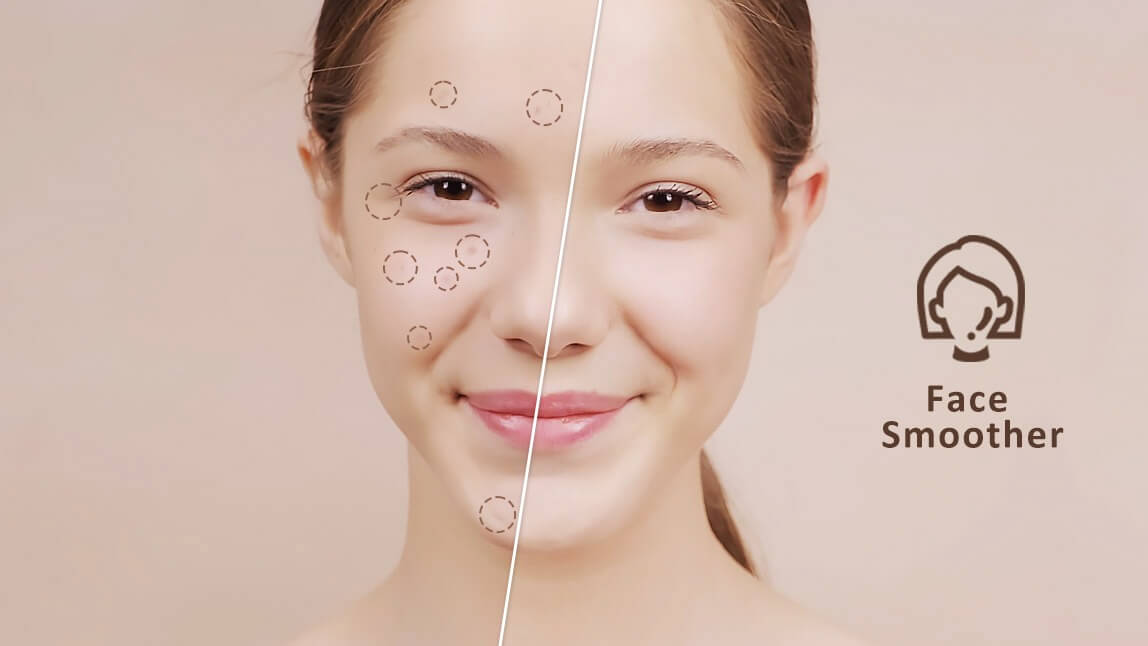
Want smoother, clearer skin in your videos? Skin-smoothing filter apps can instantly reduce blemishes, brighten your complexion, and give you a polished look—no complicated editing required.
In this guide, we tested and selected the 7 best skin smoothing video filter apps in 2026 to help you achieve flawless results effortlessly. I ran the same unedited clip — normal indoor lighting, a couple of visible blemishes — through every app's retouch tool so I could actually compare how natural (or plasticky) each one left my skin, rather than just listing features off their App Store pages, and I added Meitu to the lineup as a seventh pick.
What Are the Best Clear Skin Video Editor in 2026?
| Face Smoothing Apps | Rating (iOS/And.) | Skin Smoothing Quality |
| YouCam Video | 4.8 / 4.3 | ⭐⭐⭐⭐⭐ |
| Facetune | 4.6 / 4.3 | ⭐⭐⭐⭐⭐ |
| AirBrush | 4.8 / 4.2 | ⭐⭐⭐⭐ |
| BeautyPlus | 4.8 / 4.4 | ⭐⭐⭐⭐⭐ |
| PrettyUp | 4.7 / 4.2 | ⭐⭐⭐⭐ |
| Perfect365 Video | - / 4.3 | ⭐⭐⭐ |
| Meitu | 4.7 / 4.5 | ⭐⭐⭐⭐ |
Breakouts and blemishes shouldn’t stop you from filming your TikToks and Instagram reels.
Instead, use a skin smoother app to make every side your good side. Keep reading to discover the seven best smooth skin apps for your videos!
YouCam Video: Best Overall Clear Skin Video Editor
Shared Materials by Strapi
*Adjust the size of images ONLY. Please go to Strapi to edit the materials info.
- Available: iOS / Android
- Rating: 4.8 / 4.3
YouCam Video is one of the best AI-powered skin smoothing apps available in 2026, and here's why it stands out as a leading video editor for smooth skin:
Testing note: I ran the same close-up clip — visible redness near my chin, filmed in dim indoor light — through YouCam Video's Face Smoother. Pushed past the midpoint on the slider it started softening my jawline outline too, but kept around 40% it looked like genuinely good skin, not a blur filter.
Top Face Retouch Features of YouCam Video
- Advanced Face Smoothing Filters
- Effective Skin Brightening Filters
- Blemish Concealer and Acne Removal Filters
- Lip Plumper Filters for enhanced features
- Over 200+ AI Video Filters for creative effects
Let's see how YouCam Video can help you achieve that coveted smooth skin in videos.
How to Smooth Skin in Video
With the YouCam Video app, simply upload your video and choose the Retouch option.
Select the Face Smoother tool and use the intuitive slider to adjust the intensity, deciding precisely how smooth you want your skin to appear for that perfect finish.
How to Smooth Skin in Video: Remove Wrinkles and Fine Lines

YouCam Video empowers you to effortlessly remove acne, diminish wrinkles, and conceal any skin blemishes you’d prefer not to feature in your videos.
Get that clear skin video editor effect with just a few taps.
How to Smooth Skin in Video: Remove Blemishes for a Clear Look
YouCam Video lets you make minor touch-ups or create completely blemish-free skin in seconds, ensuring your edits look natural and seamless, perfect for anyone seeking a video skin smoothing solution.

It also allows you to easily apply a video makeup filter to any clip, which helps to further smooth over the skin and enhance your natural features.
👉 Read more: 100+ AI Video Filters: How to Put AI Filter on a Video?
Facetune: Best Clear Skin Video Editor

- Available: iOS / Android
- Rating: 4.6 / 4.3
Facetune is one of the most popular skin-smoothing video filter apps on the market right now.
It allows users to adjust and enhance their videos with its smooth and natural-looking filters, giving them an airbrushed look without making them look too fake or unnatural. This video editor smooths skin effectively for polished results.
Testing note: Facetune's smoothing leans more airbrushed than YouCam Video's — nice for a posed selfie-style clip, but on a talking-head video the effect became more noticeable whenever I turned my head under brighter light.
"OMG FacetuneVideo is amazing. I've always loved using Facetune to edit my photos and selfies- it's my go to app to making sure my photos look perfect and professional." — Susan Schwa, App Store review
"OMG FacetuneVideo is amazing. I've always loved using Facetune to edit my photos and selfies- it's my go to app to making sure my photos look perfect and professional." — Susan Schwa, App Store review
AirBrush: Best Skin Retouch App with Face Filters

- Available: iOS / Android
- Rating: 4.8 / 4.2
Another great alternative for skin-smoothing video filter apps is AirBrush. This app allows users to quickly and easily edit photos and videos with its powerful tools for color correction, sharpening, noise reduction, and much more.
It also has a great selection of face filters that can be used to smooth out blemishes and other imperfections in portraits or body shots, making it a versatile skin smoothing app for video.
BeautyPlus: Best Face Smoothing App with 100+ Beauty Effects

- Available: iOS / Android
- Rating: 4.8 / 4.4
BeautyPlus is another great skin smoothing video filter app that offers users powerful tools like real-time face tracking, auto-enhancement, blur effects, shadows & highlights adjustments, and more!
It also comes with over 100 different beauty effects plus numerous facial features such as eyeshadow colors or blushes colors, helpful for anyone wanting to edit skin in video comprehensively.
Testing note: BeautyPlus's real-time preview made it easy to dial in an effect before recording rather than fixing it after, which the after-the-fact editors on this list can't do — useful if you know you want a lighter touch going in.
PrettyUp: Best All-in-One Smooth Skin App
- Available: iOS / Android
- Rating: 4.7 / 4.2
PrettyUp is an all-in-one tool for editing both photos and videos. It lets you smooth out your skin, remove wrinkles and blemishes, and more in your videos.
Plus, with its Video Face Editor, you can tweak features like your face shape, nose, lips, eyes, and brows until you're happy with how you look in your selfie videos. It's a solid choice for a video face smooth app.
Perfect365 Video: Best Face Smoothing App for Easy Retouches
- Available: iOS / Android
- Rating: - / 4.3
Perfect365 Video has the tools you need for fast and easy skin retouching. Its face detection feature makes it easy to pinpoint the areas you want to touch up if you need to smooth your face in a video.
You can use it to cover dark circles under your eyes or apply your edits to your entire face. If the skin smoother on its own doesn’t give you enough of a change, the app has 29 foundation shades to suit your skin tone.
Testing note: Perfect365 Video's foundation-shade matching was the most useful part for me — it evened out tone without needing to blur texture at all, which several other apps here do by default.
Meitu: Best Free Pick for Natural-Looking Retouch
Available: iOS / Android
Rating: 4.7 / 4.5
Meitu is a long-running Chinese beauty and photo/video app that's built its reputation specifically on natural-looking skin retouching rather than heavy filters, and it's completely free to use.
Its dark-circle and blemish tools work directly on video, not just stills, and the reshape/smoothing sliders default to a lighter touch than several of the apps above — good if you want an edit that doesn't read as obviously edited.
Testing note: Meitu's default smoothing level was the most conservative of the seven apps I tried — it took noticeably more slider adjustment to get an equivalent effect to YouCam Video's default, which is either a plus or a minus depending on how strong an edit you want out of the box.
"I use MeituAIPhotoVideoEditor everyday, I can't believe it is free!!" — Cllumpy, App Store review, 5★
How to Smooth Skin in Videos?
You’re beautiful no matter how your skin looks, but sometimes everyone feels self-conscious. Achieving that smooth skin on video look doesn't have to be complicated.
It only takes a few taps to smooth skin in your videos when you use YouCam Video, the ultimate video smooth app. You can adjust your look, so it feels natural for you while tweaking any areas you want to change.
Follow these simple steps to create the perfect look for you using this intuitive smooth skin video editing app:
- Step 1. Download the Best Skin Smoothing App
- Step 2. Upload Your Video
- Step 3. Use the Face Smoother Tool
- Step 4. Adjust with the Slider Bar
- Step 5. Utilize the Conceal Tool
- Step 6. Save Your Enhanced Video
Step 1. Download the Best Skin Smoothing App: YouCam Video
Download YouCam Video, the best video skin smoothing app free to start, from the Apple Store or Google Play.
Shared Materials by Strapi
*Adjust the size of images ONLY. Please go to Strapi to edit the materials info.
Step 2. Upload Your Video to the Editor
Tap the blue + button at the bottom of the screen. Choose the video you want to edit from your phone and upload it to YouCam Video.
Step 3. Use the Face Smoother Tool to Smooth Skin
 Select Retouch from the options in the bottom bar. Then, tap the Face Smoother tool to begin enhancing your skin.
Step 4. Use the Slider Bar to Adjust Skin Smoothness
Adjust how smooth your skin looks by using the slider bar.
Bring it all the way to the right for extra-smooth skin or slide it to the left until you reach your ideal natural look. This smooth video editing app feature gives you full control.
Step 5. Use the Conceal Tool for Flawless Skin

To achieve truly smooth and flawless skin, use the "Concealer tool" in YouCam Video.
This AI-powered tool automatically detects and eliminates facial blemishes, ensuring a natural and polished appearance after editing. It's a key feature of this video skin editor.
Step 6. Save Your Perfectly Smoothed Video
Tap the blue checkmark in the bottom right corner to save your edits.
Besides its powerful skin smoothing features, feel free to explore YouCam Video’s other tools like adding video filters or effects. Once you're happy, tap the export button in the top right to save your edited video.
Why Is YouCam Video the Best AI Skin Smoothing App?
YouCam Video has all the tools you need to achieve beautifully smooth skin in your videos, without needing complex acne treatments or buying expensive skincare products just for a recording.
While it’s great to take care of your skin, sometimes blemishes happen. When they do, YouCam Video can help you look your best on camera with its easy-to-use skin smoothing video filter app free features.
More Skin Smoothing Ideas & Video Editing Tips
- How to Remove Wrinkles in Video for a Youthful Look
- How to Remove Acne & Blemishes in Video for Clear Skin
- How to Brighten Face in Video for a Radiant Glow
Pro Tips for Natural-Looking Skin Smoothing on Video
A few things that made the biggest difference across all 7 apps I tested:
- Under-edit rather than over-edit. Every app here looks best around 30-50% of its maximum smoothing strength — pushing to full strength is what makes skin start to look plasticky or lose texture entirely.
- Match your lighting before you edit, not after. Flat, even light gives any smoothing tool less blemish and shadow detail to fight with, so the retouch looks more natural at a lower setting.
- Check the result in motion, not just on a single frame. A smoothing effect that looks fine paused can shimmer or flicker slightly frame-to-frame — scrub through the whole clip before exporting.
- Keep your unedited original. If you're posting to multiple platforms, re-exporting from the smoothed version instead of the source can compound the effect each time you re-edit.
Face Smoothing App FAQ
What are face smoothing video apps?

Face-smoothing video apps like YouCam Video are applications designed to enhance the appearance of skin in videos.
These apps use various techniques such as blurring, smoothing, and brightening to give the skin a more even and polished look.
They are popular among social media influencers, video creators, and anyone who wants to improve the look of their skin in videos.
However, it's important to note that the use of these face smoothing apps can create unrealistic beauty standards and may perpetuate negative body image issues.
Are skin-smoothing video apps safe to use?
Skin-smoothing video apps are generally safe to use, but it's important to be mindful of the potential negative impact they can have on self-esteem and body image if used excessively.
Always download them from reputable sources and use them in moderation.
What app makes your skin smooth?
YouCam Video instantly smooths your skin with its retouch tools. Use the slider bar in the Face Smoother tool to adjust how smooth your skin looks in your video.
Is there an app to smooth skin in video editing?
You can find several apps that smooth skin in videos, including:
- YouCam Video
- Facetune
- Perfect365 Video
- Perfect Me
- PrettyUp
YouCam Video is the easiest, most natural face smoothing app for video, so start exploring it to get professional-level edits!
How do you blur my skin in an app?
YouCam Video’s skin smoothing filter removes blemishes, acne, wrinkles, and any other skin features you’re not happy with.
All you have to do is choose the Retouch and Face Smoother tools to get the desired effect.
Is there an app to smooth skin in video editing?
Yes, there are several face smoothing apps available in video editing. Many video editing applications, such as YouCam Video, offer skin smoothing video filters to enhance and smooth skin.
This kind of smooth editing app allows users to apply various filters and adjustments to achieve a smoother appearance for the skin in video footage.



