


 Author:
 Mother's Day 2026 is the perfect excuse for a mother-daughter photoshoot, whether it's a candid moment at home or a golden-hour shoot outdoors. But even the most heartfelt photos deserve a little polish.
In this guide, we'll share the best Mother's Day photoshoot ideas for 2026 and show you how to edit them into stunning portraits with YouCam Makeup's AI photo editing tools.
- 3 Mother's Day Photoshoot Ideas to Try in 2026
- Best App for Mother's Day Photo Editing
- Best Mother's Day Photo Effects & Frames
3 Mother's Day Photoshoot Ideas to Try
1. Cozy At-Home Shoot
Some of the most heartfelt mother-daughter photos happen right at home, like baking together, sharing a morning coffee, or curled up on the sofa. Set up near a window for soft natural light and let the moment happen naturally.

2. Garden & Flower Shot
Mother's Day falls right at peak bloom season, making gardens, flower markets, and parks the perfect natural backdrop. Soft daylight and colorful florals do most of the work for you.

3. Golden Hour Outdoor Shoot
The 30–60 minutes before sunset gives you warm, flattering light that makes every photo look professionally taken. A beach, park, or tree-lined path all work beautifully.

Best App for Mother's Day Photo Editing

YouCam Makeup is the best photo editor to capture and perfect your Mother's Day photos on iPhone and Android in 2026.
The app features thousands of Mother's Day photo effects, live frames, and AI beauty tools to make every mother-daughter photo extra special.
From animated backgrounds to floral frames and skin-smoothing retouching, everything you need is in YouCam Makeup.
How Edit Mother's Day Photos with YouCam Makeup
- Step 1: Download the best photo editor YouCam Makeup.
- Step 2: Tap "Camera" or upload an existing photo.
- Step 3: Tap Looks and browse the Mother's Day Glow collection.
- Step 4: Try Live Frames for animated Mother's Day borders
- Step 5: Tap the Store icon to discover more Mother's Day filters.
- Step 6: Save and share your photo directly to social media

Best Mother's Day Photo Effects & Frames
Now that we've discovered the main features of the best Mother's Day photo editing app, here are some awesome Mother's Day photo effects and frames that are perfect for mother-daughter photos.
1. Pink Ribbon Frame

This beautiful Mother's Day live frame wraps your photo in soft pink ribbons with a sweet "I ❤️ Mom" message — perfect for dressing up your at-home photoshoot shots.
To try this Mother's Day photo effect, open YouCam Makeup, go to the Live Frame collection and tap The Ribbon.
2. Sparkling Roses Frame

The Mom Magic live frame adds blooming roses, a pink sparkling effect, and a "Love My Mom!" message is ideal for pairing with your garden photoshoot photos.
To try this look, download YouCam Makeup and go to the Live Frame collection.
3. Purple Hearts Frame

the bond between mother and daughter with this animated Mother's Day photo frame, complete with floating purple hearts and a festive makeup look.
To try this effect, download YouCam Makeup, go to Live Frame collection and choose the free face filter Mom's Heart.
4. Pink Kitty Cat Filter

Add a playful touch to your golden hour outdoor shots with this cute photo effect — fluffy pink cat ears, whiskers, and floating hearts included.
To try it, go to the Mother's Day Glow collection and choose the Pink-a-Boo filter.
5. Smooch Filter
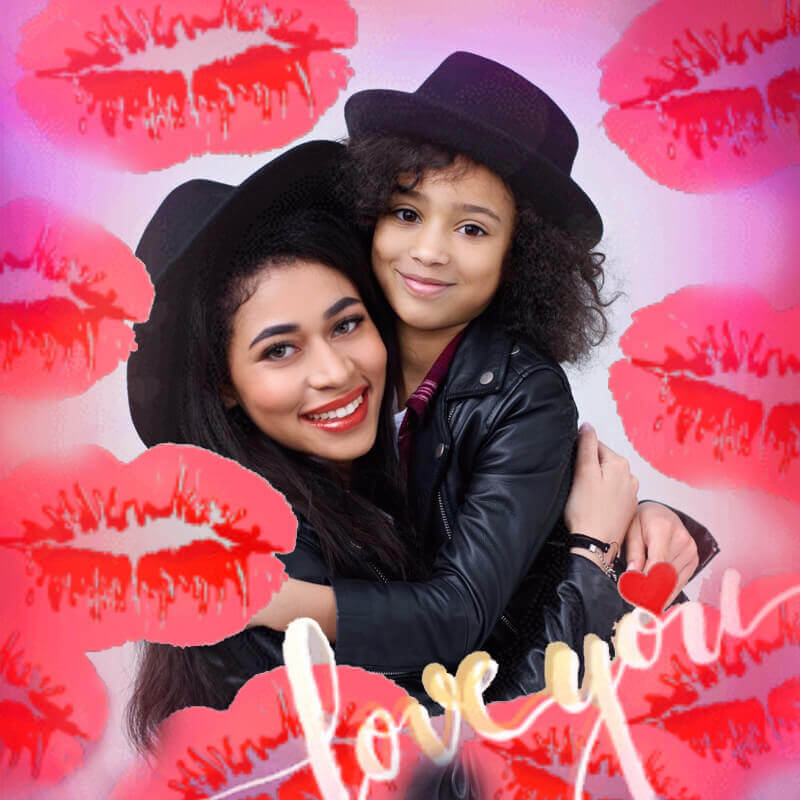
Show Mom some love with the Sweetheart effect with big red lipstick smooches and a "love you" message that turns any candid shot into a shareable moment.
To try this, go to the Mother's Day Glow collection.
6. Happy Mother's Day Filter

Complete your garden or outdoor photoshoot with this dreamy photo effect a floral crown, flower frame, and "Happy Mother's Day" message all in one.
To try this filter, go to the Mother's Day Glow collection and choose the Rosey Day filter.
Download YouCam Makeup for Mother's Day Photos
This Mother's Day 2026, give Mom a gift she'll always cherish! A beautifully edited mother-daughter photo captures the real moment better than anything else. Whether it's a cozy at-home shot, a garden photoshoot, or a golden hour portrait, YouCam Makeup has every photo effect and live frame to make your Mother's Day photoshoot truly unforgettable.
Celebrate Mother's Day 2026 with a stunning photo to show your love now!

More Mother's Day Photo Editing Ideas
- 50 Mom’s Day Meme ideas for Instagram (Free Download)
- Free AI Mother's Day Card Maker for 10+ Greeting Card Styles
- Happy Mother’s Day Video Maker: Free Stickers, AI Effects, Filters & Text
- Create Mother's Day Digital Picture Frames
- 5 Sweet Mother's Day Picture Ideas You Should Try
- Best Mother's Day Card Maker: Create Free Mother's Day eCards
Mother’s Day Photo Ideas FAQs
When is Mother’s Day 2026?

In the U.S., Mother’s Day falls on the second Sunday of May each year. Mother’s Day 2026 will be on May 10.
Why is Mother’s Day different in the UK?
Mother’s Day in the UK, known as Mothering Sunday, has different origins from the American version. It falls on the fourth Sunday of Lent and began as a religious tradition where people returned to their "mother church" for a special service. Over time, it evolved into a day to celebrate mothers. In 2026, Mother’s Day in the UK will be on 15 March. This differs from Mother’s Day in countries like the U.S., which is celebrated in May and comes from a secular movement to honor mothers.
How to take a good mother-daughter photo?
The best way to take an excellent mother-daughter photo for Mother’s Day 2026 is to have fun! Share your love for each other, get creative, and laugh. When you’re having an authentic moment, it’s easy to create a picture that you’ll cherish forever.
What should I wear for Mother’s Day pictures?
For Mother’s Day pictures, aim for outfits that are classic, coordinated, and comfortable. Soft pastels, floral prints, or neutral tones work well and give a warm, timeless feel. Coordinating colors with family members (without being too matchy-matchy) helps create a cohesive look. Avoid bold logos or overly busy patterns that can distract from the moment. Most importantly, choose something that makes you feel confident and relaxed — it’ll show in the photos.
How can I say Happy Mother’s Day in a unique way?
Instead of the usual "Happy Mother’s Day," try something more personal and creative, like:
- And here's to my mama had to listen to all this drama.
- Thank you for being my first friend, my best friend, and my forever friend.
- To the woman who made me everything I am, today is all about you.
- Wishing you a day as beautiful and special as your love has always been.
What is a good Mother’s Day post?
A good Mother’s Day post is genuine, personal, and thoughtful. You can share a heartfelt message, a favorite photo together, or a small story that shows what makes your mom special. Here’s a simple structure that works well:
- Start with a warm greeting (“Happy Mother’s Day to the most amazing mom!”)
- Share something personal (“Thank you for teaching me strength, kindness, and how to laugh through it all.”)
- End with appreciation or love (“Love you more than words can say.”)
Adding a photo or short video makes it feel even more special and engaging.
What’s a great Mother’s Day post caption on Instagram?
Here are a few caption ideas, depending on the vibe you want:
- Sweet & Simple: “Happy Mother’s Day to the woman who does it all — and makes it look easy.”
- Heartfelt: “Everything I am, you helped me to be. Love you, Mom.”
- Playful: “Behind every great kid is an even greater mom. Thanks for putting up with me.”
- Trendy: “She’s beauty, she’s grace — she’s my mom.” Photo-focused: “Forever my favorite person to smile with.”



