Author:


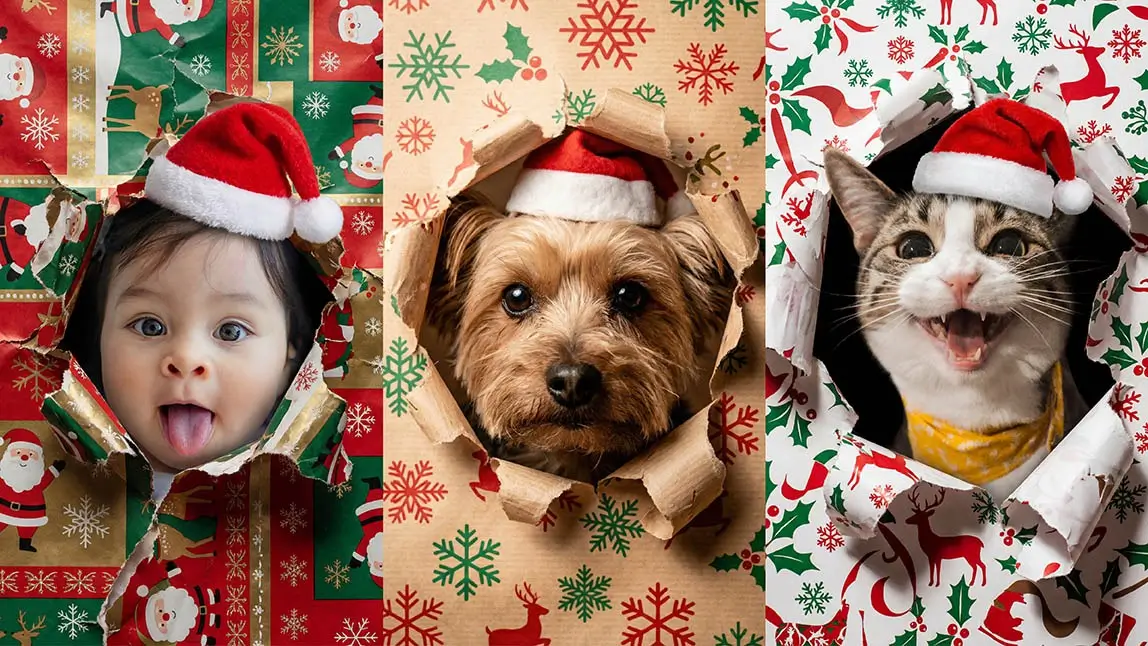
If you’ve spent any time on TikTok or Instagram during the holidays, you’ve likely seen adorable photos of dogs, cats, or even babies appearing to burst through wrapping paper.
In this guide, we’ll cover everything you need to know about the wrapping paper trend and show you how to create realistic, share-worthy photos.
What Is Wrapping Paper Trend?

Common versions of the trend include:
• Dogs bursting through Christmas wrapping paper
• Cats peeking curiously through torn paper
• Babies revealed like a carefully opened present
As the trend evolved, AI-generated versions became increasingly popular because they look realistic while avoiding physical props.
Why Did the Wrapping Paper Trend Go Viral?
- Instantly Scroll-Stopping
Bright patterns, ripped paper edges, and centered faces grab attention immediately. - Pets & Babies Always Perform Well
Animal and family content consistently drives high engagement across platforms. - Perfect Timing
The trend exploded during the holiday season, when festive visuals dominate social feeds. - Easy to Personalize
With AI, creators can customize paper styles, expressions, and moods endlessly.
How to Do the Wrapping Paper Trend Manually?
Before AI tools became popular, the wrapping paper trend was originally created manually using real wrapping paper. While this method can produce authentic results, it also comes with a few challenges—especially when pets or babies are involved.
Here’s how the manual wrapping paper trend typically works.
Step 1: Prepare the Wrapping Paper
Tape a large sheet of wrapping paper across a doorway, cardboard frame, or between two stable surfaces. The paper should be stretched flat but not overly tight.
Step 2: Set Up the Camera
Position your phone or camera directly in front of the paper. Make sure the lighting is bright and even, and that the camera is stable.
Step 3: Encourage the Subject Forward
For dogs: owners often call the dog or toss a treat to encourage movement.
For cats: this step is harder, as most cats won’t cooperate.
For babies or children: this step is not recommended for safety reasons.
Step 4: Capture the Moment
Take multiple photos or record a video as the paper tears and the face appears through the opening.
How to Create Wrapping Paper Photo with YouCam Perfect
With Image to Image in YouCam Perfect, you can recreate the wrapping paper trend in just a few taps—and the results look surprisingly real.
Step 1: Open YouCam Perfect and select “Image to Image”
Download or open YouCam Perfect and tap Image to Image from the home screen.
Step 2: Upload your photo
Choose a clear photo of your dog, cat, or baby. Front-facing photos with good lighting work best.

Describe the wrapping paper style, motion, and mood you want (examples below).
Step 4: Generate and save
Tap Generate, preview the result, and save your AI-powered wrapping paper trend photo.

3 Fun Use Cases for the Wrapping Paper Trend
One reason the wrapping paper trend continues to go viral is its flexibility. With AI, you can adapt the trend to different subjects and moods while keeping results realistic and safe.
Below are three carefully designed scenarios—each with a detailed, copy-ready AI prompt.
Wrapping Paper Trend Prompt 1 - Dog

This version captures a lively moment where the dog appears to burst through wrapping paper with excitement and joy. Here's the AI Prompt for Dog:
"Create a highly realistic photo of my uploaded dog bursting through wrapping paper.
The dog’s face is pushing forward through a torn hole, creating a strong sense of motion and impact.
Red wrapping paper with small white polka dots is ripped outward, with uneven, curled paper edges.
The paper looks stretched and torn as if just broken through.
The dog’s fur texture, facial expression, and proportions remain completely natural and photorealistic.
Natural studio lighting, soft shadows, realistic color tones.
Shallow depth of field, DSLR-style photography.
Ultra-high resolution, looks like a real photograph."
Wrapping Paper Trend Prompt 2 - Cat

Instead of bursting, the cat gently peeks through torn paper, creating a calm and cozy visual. Here's the AI Prompt for Cat:
"Create a realistic photo of my uploaded cat peeking through torn wrapping paper.
The cat’s head is partially emerging through a ripped hole in the paper, with a calm and curious expression.
The wrapping paper is red with subtle white polka dots, torn naturally with soft, curled edges.
Paper texture looks thin and realistic, with gentle folds around the opening.
The cat’s eyes are sharp and in focus, with detailed fur texture and natural proportions.
Soft natural lighting, gentle shadows, realistic color grading.
Shallow depth of field, photorealistic DSLR-style image."
Wrapping Paper Trend Prompt 3 - Baby / Child

For babies, the wrapping paper trend should feel gentle and warm—like carefully opening a present rather than tearing it. Here's the AI Prompt for Baby / Child:
"Create a soft, realistic photo of a baby gently revealed through wrapping paper.
The baby’s face appears through a neatly opened hole in the paper, as if the wrapping is being carefully unwrapped.
The wrapping paper is light cream with subtle holiday patterns, softly folded rather than aggressively torn.
Paper edges are smooth, slightly curled, and clean, showing delicate paper texture.
The baby’s expression is calm and curious, with natural skin tone and realistic facial details.
Soft natural lighting, warm and cozy atmosphere.
Shallow depth of field, professional lifestyle photography.
High resolution, photorealistic image, looks like a real family photo."
Join the Wrapping Paper Trend the Smart Way
The wrapping paper trend is festive, fun, and irresistibly cute—but it doesn’t have to involve real paper or risk. With YouCam Perfect, anyone can create realistic wrapping paper trend photos in minutes.
Whether it’s a playful dog, a curious cat, or a heart-melting baby reveal, AI makes it easy to turn everyday photos into viral-worthy moments.
👉 Try the wrapping paper trend today with YouCam Perfect, and share your creation with the world.