Author:


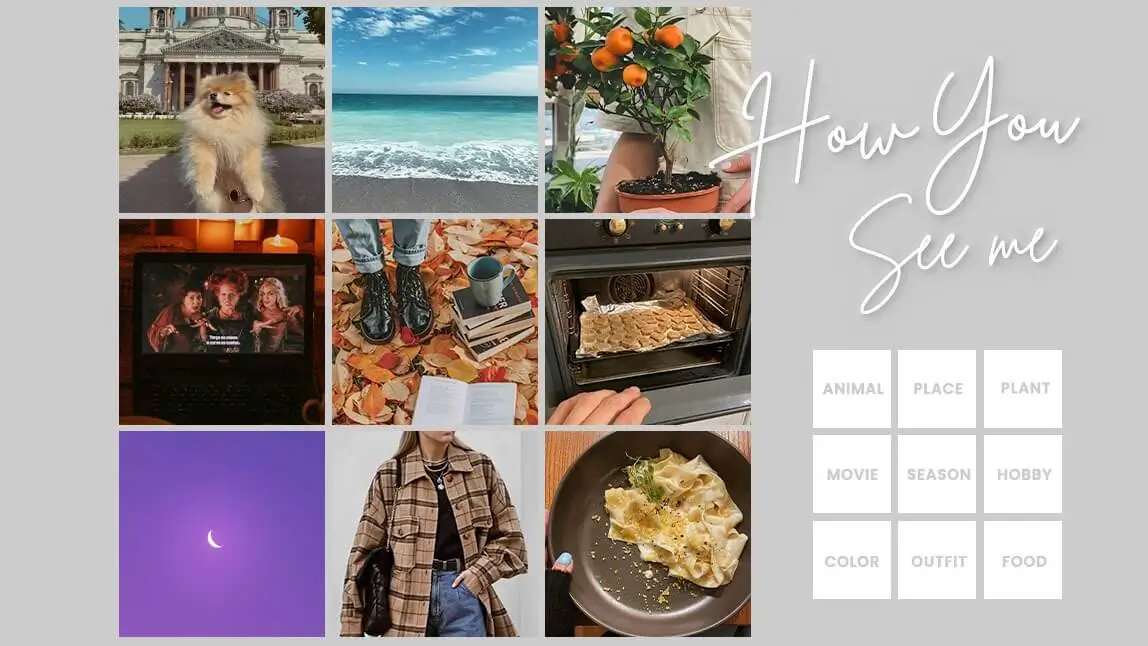
The “How You See Me” challenge has always been a popular trend on TikTok, reminding me of the “How We See Each Other” or "How He Sees Me" trend last year.
You may want to know what it is and how to participate in this cute trend with your friend, your lover, or your family. Read on to learn more!

What is the “How You See Me” Challenge?
The "How You See Me" challenge is a viral social media trend where users create a 3x3 photo collage representing their personality. By searching 9 specific categories on TikTok—such as Vibe, Song, Color, Place, and Character—creators use the first search result to build a visual aesthetic of how the algorithm (or a partner) perceives them.

For example, it may be a dolphin for animals and a cactus for plants. You can also do the challenge solo using picture ideas from Pinterest to represent how you see yourself!

The 9 Search Terms You Need for the Template
To make your collage, search these 9 keywords on TikTok and screenshot the top result:
- Vibe: Your overall aesthetic.
- Song: The track that matches your energy.
- Color: Your signature hue.
- Place: Where you belong.
- Movie: The film that mirrors your life.
- Trend: The viral moment that defines you.
- Character: Your fictional twin.
- Actor: The celebrity you resonate with.
- Quote: The words you live by.
How to Get the ‘How You See Me’ Template? (3 Easy Methods)
 Download


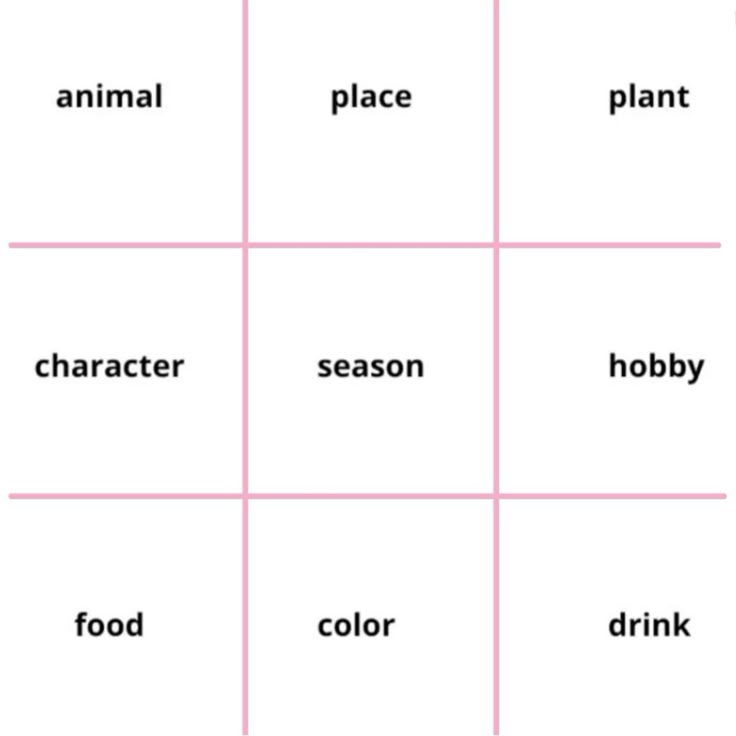
The "How You See Me" trend, or the " How We See Each Other" challenge has gone viral for a period of time on TikTok. Whether you want a fully customized aesthetic or a quick one-tap viral shortcut, here are the three best ways to join the "How You See Me" trend.
Method 1: The YouCam Perfect Collage (Best for Customization)

Best AI Photo Editor
The Best AI Photo Editor & Selfie Camera.
Remove objects, apply filters & more.
To create a template for the “How You See Me” challenge, you can customize it with different categories using YouCam Perfect. Here’s how:
Step1. Download the free photo template app, YouCam Perfect.
Step2. Go to the Collage section on the homepage.

Step3. Choose nine pictures according to your selected categories and select the nine-pics grid template.
Step4. You can find images in the Stock category or search on Google or Pinterest and download them to your phone.
Step5. Adjust the size and placement of your photos to fit the template, ensuring everything is clearly shown.
Step6. Lastly, add text like “How I See Her” or “How You See Me” in the middle of the collage. Save it and share it on TikTok!


Method 2: The "How We See Each Other" (Bestie & Couple Edition)
This variation is less about search results and more about personal perception. It’s perfect for showing how you view your partner or best friend.
- The Concept: Instead of TikTok search results, use 9 photos you have personally taken of your favorite person.
- Categories: Use labels like "The Animal You Remind Me Of," "The Song That Is You," or "The Character You Act Like."
- The Polish: Use the AI Background Extension or Filters in YouCam Perfect to ensure all 9 photos have a cohesive, professional color grade before putting them in the grid.
Method 3: The CapCut Template
If you prefer a video format with built-in transitions and timed music, the CapCut shortcut is the most popular "one-click" option.
- Search the Trend: Open TikTok and search for "How You See Me Template."
- Locate the CapCut Button: Tap on a viral video using the trend. Above the creator’s username, click the button that says "CapCut - Try this template."
- Use Template: You will be redirected to CapCut. Hit "Use Template" and select your 9 screenshots from your camera roll.
- Export to TikTok: Once the video generates, tap "Export" to share it directly back to TikTok.
How to Do the Recent 'How TikTok See Me' Trend?
If you are interested in trying out the latest trend about 'How TikTok Sees Me', then read on!

- First, type the keywords like "vibe", "place", "movie"...all nine of them on your TikTok search bar, and download the videos
- Then, you can search for the keyword "CapCut How TikTok Sees Me", then you should be able to find a template for you to try
- If you cannot find the template, can also try the ones on YouCam Perfect! It allows you to add photos and fonts to a customized collage template

Latest User Reviews
Users love YouCam Perfect’s Collage feature for making the "How You See Me" challenge easy and fun. The app’s customizable 3x3 grids and simple photo adjustment tools help users create meaningful, shareable collages quickly.
- Many users rate the app positively on official platforms. The average score for YouCam Perfect-style photo editors can be around 4.45/5 with a majority giving 4–5 stars, praising ease of use and photo enhancement quality. - Review from WorldApps
- “Pics come out so clear and effects are amazing.”- Review from App Store
- Some praise the app’s tools for smooth skin, remove blemishes, and enhance images — especially useful for quick social media editing.- Review from App Store
Bonus: 'How I See Me' Challenge & 'How I See My Boyfriend' Challenge
How I see Me
Following the 'How You See Me' trend, there is a new challenge on TikTok these days. The 'How I See Me' challenge is to rate yourself according to different categories by coloring the jars.
You can get the 'How I See Me' template simply by tapping any video of this topic on TikTok and click 'try this template'.
Color your 'How I See Me Jars' to join the trend!

How I See My Boyfriend
There is another trend, which is the 'How I See My BF' challenge, going on and off on TikTok. Also known as "How He Sees Me" trend.
It is about how girlfriends see their boyfriends differently from others. While others see their boyfriends as normal people, they see their boyfriends as Google, Wikipedia, a human calculator, and even Google Map!

How I See My Boyfriend Trend on TikTok
Unsurprisingly, you can also participate in the trend by using YouCam Perfect, too! Try the Cut Out tool in the app, and copy and paste the cut photo of your bf!

Read more: How to Cut Something out of a Photo | Image Cutout App
Try the How You See Me Template with the Best Collage App
Best AI Photo Editor
The Best AI Photo Editor & Selfie Camera.
Remove objects, apply filters & more.
YouCam Perfect allows me to create my own "How We See Each Other" template and join the trend easily. And the other features such as body tuner and background changer are also useful for photo editing.
Thanks to this AI supported tool, I get to make a "How You See Me" video with all the photos well edited. What are you waiting for? Start and try your How You See Me challenge now!
About the Editors

The PERFECT Corp. Editorial Team
We are a team of experts on photo and video editing apps. Our goal is to deliver engaging content on everything from stunning selfie edits to eye-catching video effects. We cover the latest trends and share niche tips to help you master digital creation.
Discover more about us: