


 Author:
 Even great photos sometimes need a little polish — clean up pictures for holidays, vacations, celebrations, or everyday shots with smart AI editing that’s faster and easier than traditional software.

Best AI Photo Editor
The Best AI Photo Editor & Selfie Camera.
Remove objects, apply filters & more.

Best App to Clean Up Pictures Using AI Object Removal

Best AI Photo Editor
The Best AI Photo Editor & Selfie Camera.
Remove objects, apply filters & more.
YouCam Perfect, a free AI photo cleanup app for iPhone and Android, uses advanced generative AI and computer vision technology to automatically remove unwanted objects from photos and intelligently fill the background for realistic results.

How to Clean Up Pictures Using AI Object Removal
Got a picture with nicely made food ready to be posted on your socials that has unwanted clutter in the background, uneven color tones, or even unwanted people?
Here’s how easy it is:
Step 1: Download The Best App to Clean Up Your Pictures
Best AI Photo Editor
The Best AI Photo Editor & Selfie Camera.
Remove objects, apply filters & more.
Open YouCam Perfect’s AI-powered photo editing interface and upload the image you want to clean up. There are also countless free features right at your fingertips, so you can make any picture look amazingly creative.
Step 2: Clean Up Your Pictures
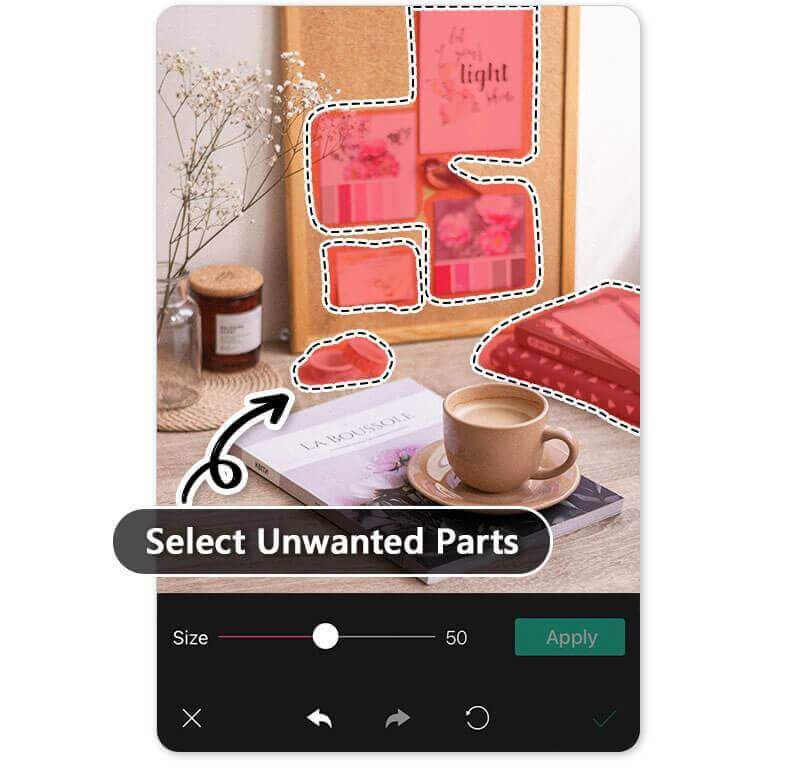
- Tap on Photo Edit on the app’s home screen.
- Then, upload the photo you want to clean up.
- Use YouCam Perfect’s AI Removal tool powered by generative AI to brush over unwanted objects and background clutter.
- It will be highlighted in red. Make sure to completely cover the objects you want to remove with red before you remove them for the best results.

Once you highlight it, tap Apply in the bottom right corner to see the object magically erased. That’s all it takes to quickly remove any item in your background! You can even swap the background for a different photo or design too.

Step 3: Bring Your Clean Picture to Perfection

Make any photo picture perfect by adjusting other settings on your photos like Perspective, Exposure, and HDR.
You can even add cute stickers or special effects like aesthetic filters, glitter, and animations.
Step 4: Save Your Clean-Up Picture!
Lastly, save and share your edit. You can save it directly to your phone or share it on any social media platform, from Instagram, Facebook, Pinterest, to TikTok.
Why Use YouCam Perfect: Best App to Clean Up Photos
Here are some scenarios when you need to try YouCam Perfect:
#1 Remove Unwanted Objects with Generative AI

▲ Our generative AI will auto-fill the removed area based on the photo structure
Cleaning up unwanted objects helps further highlight the subject you want to emphasize in the picture. YouCam Perfect uses generative AI object removal technology to erase unwanted objects while automatically reconstructing the background based on surrounding visual context.
#2 Clean Up Backgrounds in Seconds

▲ Get your perfect travel photo with our generative AI clean-up picture tool
Getting rid of random strangers when taking pictures in famous attractions is never a mission possible. With YouCam Perfect, the best photo-cleaning app, you can easily remove photo bombers without leaving an awkward stain on the removed areas. The AI will analyze your picture structure and automatically replace the removed area, making your photo clean-up result natural.
#3 Clean Up Glares or Reflection in a Photo
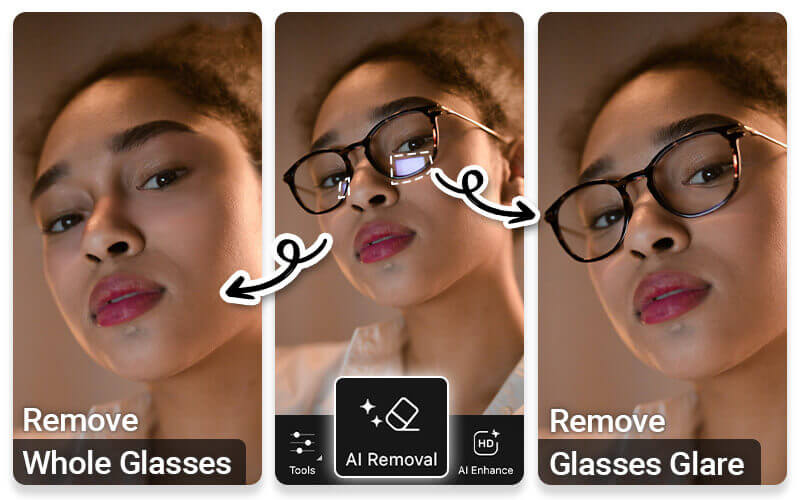
It's easier to see a reflection or light glare shown on your glasses, especially when taking photos near your light source. We feel you!
With the best photo cleaner app's "AI Removal" feature, you can either remove glare from your photo; or remove the glasses on your face without noticeable editing marks!
4. Remove Glasses from Photo with AI Prompts
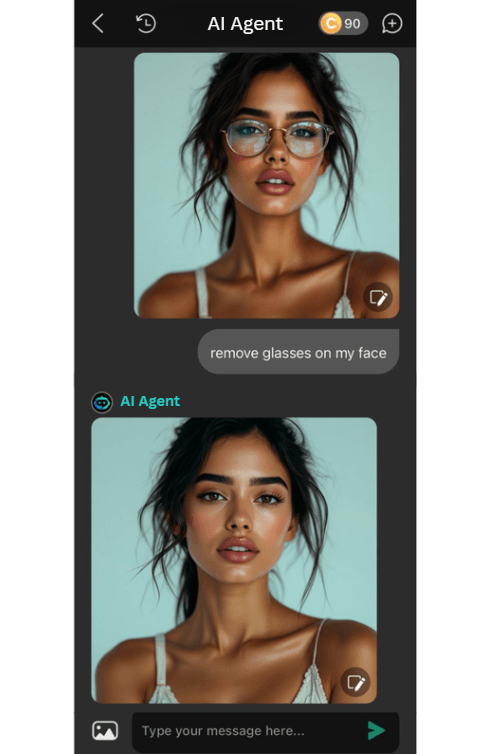
If you’ve ever taken the perfect selfie or portrait—only to realize your glasses caused reflections or didn’t match your desired look—YouCam Perfect’s AI Agent makes fixing it easier than ever.
It lets you edit photos simply by typing a short AI prompt, turning advanced photo editing into an effortless, one-step process.
Get the Best Free App for Cleaning Up Pictures
Best AI Photo Editor
The Best AI Photo Editor & Selfie Camera.
Remove objects, apply filters & more.
Whether you want to remove unwanted objects, clean up backgrounds, or enhance photos for social media, try YouCam Perfect!
It is an AI-powered photo cleanup app trusted by millions of users worldwide, ideal for travelers, content creators, and everyday users who want fast, AI-powered photo cleanup on mobile.
Download the app on iOS and Android now to clean up your image!
About the Editors

The PERFECT Corp. Editorial Team
We are a team of experts in AI-powered photo editing, building intelligent tools like YouCam Perfect that use generative AI object removal technology to help people clean up pictures and enhance visuals effortlessly. Backed by Perfect Corp’s global AI platform, our technology is trusted by millions of users and adopted by brands worldwide.
Photo Cleaner App FAQs
What is the Best App to Clean up Photos?

There are many apps out there that will help you with picture cleanup, but YouCam Perfect is your best option. That’s because it’s free to download on iOS and Android, and the user-friendly interface is simple to learn. Plus, you’re just a few taps away from making all the edits you want.
How to Clean Up Pictures on My Phone?
To achieve your perfect photo clean-up result while removing unwanted text, objects, or people on your iPhone or Android device, simply:
- Get the best photo cleaning app YouCam Perfect
- Tap Photo Edit and upload a picture
- Locate AI Removal on the toolbar
- Press Plus to clean up small areas in the photo
- Press Pro to clean up large areas in the photo
- Save and share your perfectly cleaned-up picture
How Do I Clean Up Pictures?
Even if you snap a great photo, most images usually need some edits to look their best. Photoshop and Lightroom are standard programs used to clean up pictures, but they cost money and take time to master. Instead, you should download YouCam Perfect to clean up a picture within seconds.
How Do I Clean Up an Image Without Photoshop?
Using Photoshop isn’t the only way to clean up an image. You can actually do it faster and easier with YouCam Perfect.
Just download the app for free to access countless editing and retouching tools like object removal, background swap, and light adjustments for unforgettable photos.



