


 Author: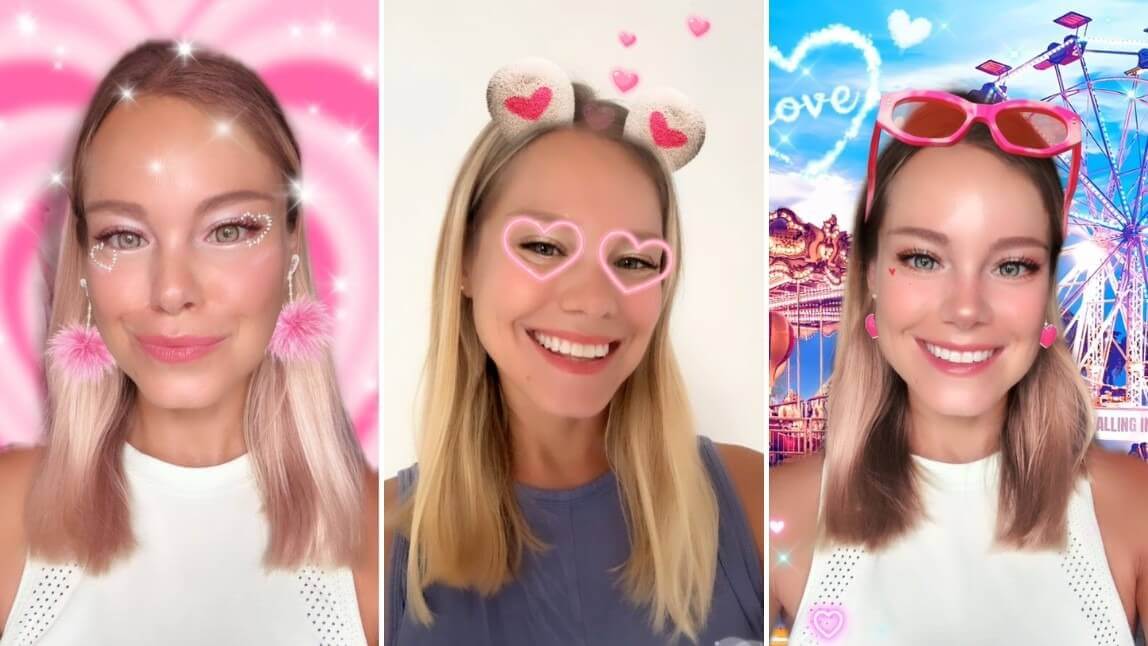
Want to stand out on the most romantic day of the year?
Inside our app, there are 50+ Valentine’s Day filters designed to make your most creative Valentine's Day picture ideas come true instantly. To save you time, this article highlights the 12 most-used filters currently trending on TikTok and Instagram.
Scroll down to unlock the 2026 looks that will make your stories go viral!
Best App for Valentine's Day Selfies & Instagram Stories
YouCam Makeup is the best Valentine's Day filter app for taking or editing your selfies on iPhone and Android for Valentine's Day.
From beautiful makeup to adorable accessories like earrings and sunglasses, and animated backgrounds and heart effects, these Valentine's Day filters help you take the cutest Valentine's Day selfie!
➤ How To Try Valentine's Day Filters
Best Valentine's Day Filters to Try in 2026
To stand out on Valentine's Day 2026, here are 12 popular Valentine's Day filters in 2026 you must try:
12 Valentine's Day filter (by theme)
- Fun Fair Date
- Diamond Heart Filter
- Pink Hearts Filter
- Heart Sunglasses
- Minnie Mouse Magic
- Emoji Hearts Filter
- Purple Hearts
- Teddy Bear Bliss
- Heart Crown Filter
- Rose Glam
- Graphic Hearts
- Sweet Peach
💖 Romantic & Dreamy
🎀 Cute & Playful
✨Trendy & Bold
🌹Elegant & Glamorous
Valentine's Day Filter #1: Fun Fair Date

Jazz up your Valentine's Day selfie with the "Flirty Pink" filter that comes with pink sunglasses, cute eye makeup, pink heart earrings, and enjoy the playful vibe of floating neon hearts against a lively fun fair backdrop.
Valentine's Day Filter #2: Minnie Mouse Magic

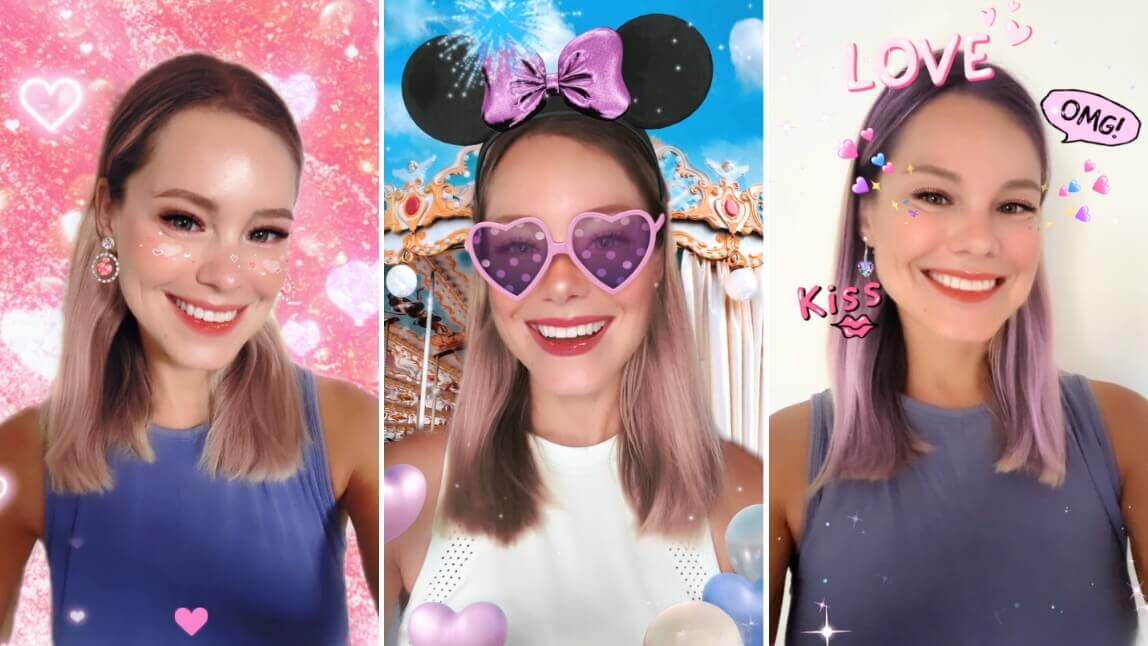
Get into the Disney spirit with Minnie Mouse-style fun! Wear big mouse ears with a cute purple bow, and purple heart-shaped sunglasses, and strike a pose amidst floating balloons against a backdrop of a beautiful carousel, a serene blue sky and fireworks.
Valentine's Day Filter #3: Diamond Heart Filter

Add a touch of elegance with diamond heart eye makeup, fluffy pink earrings, and a pink heart background. This filter is all about bringing a touch of glamour to your Valentine's Day selfies.
Valentine's Day Filter #4: Purple Dreamland

Dive into a dreamy atmosphere with cute pastel eyeliner, purple heart face art, and purple ombre hair. The animated background with white hearts and stars completes the enchanting look.
Valentine's Day Filter #5: Teddy Bear Bliss

Embrace the cuteness with lovely teddy bear ears, floating pink hearts, and a fun neon heart eyes effect when you open your mouth. This filter is perfect for capturing the warmth and joy of love in your Valentine's Day selfies.
Valentine's Day Filter #6: Emoji Hearts Filter

Add a pop of fun to your Valentine's Day selfie with a cool purple hair filter and cute cartoon and heart emojis. Let the lively colors and playful emojis express the love and joy of the season in a standout way.
Valentine's Day Filter #7: Charming Pink Hearts Filter

Elevate your look with beautiful eye makeup, heart face art, and a subtle pink hair filter. Don heart and diamond earrings, set against an animated pink heart background for a dreamy and sophisticated Valentine's Day selfie that's both chic and romantic.
Valentine's Day Filter #8: Heart Crown

Keep it simple and adorable with a pink hair filter and a cute emoji heart floating above your head like a crown. This easy-to-use filter creates a light and joyful vibe, making it perfect for capturing the love and happiness of Valentine's Day in your photos.
Valentine's Day Filter #9: Rose Glam

If you’re looking for something dramatic but still romantic, this filter is for you! It adds beautiful rose patterns around your eyes, complemented by soft pink highlights on your cheeks and lips. The result? A gorgeous glow that will make you look like an angel on Valentine’s Day!
Valentine's Day Filter #10: Heart Sunglasses

Get ready to turn heads when you use this filter! It adds a vibrant red hue to your cheeks and lips, along with sparkling heart-shaped glasses that will make you look like Cupid himself (or herself)! Plus, it also comes with a cute neon heart background that can make you stand out effortlessly.
Valentine's Day Filter #11: Graphic Hearts

If you’re feeling daring and bold this year, why not try the neon pink eyeliner look? This filter gives you the most stylish neon pink eye look, definitely perfect for making an entrance on Valentine’s Day!
Valentine's Day Filter #12: Sweet Peach

If you want something more subtle yet still romantic, then the romantic peach filter is ideal for you. This one adds just enough blush and highlights to give your skin a healthy flush while still keeping things natural looking.
How to Add Valentine's Day Filters to Photos
Step 1. Download Valentine's Filter App
Download the best Valentine's Day filter app YouCam Makeup.

Best Selfie Camera
The #1 Virtual Makeover & Selfie Camera App.
Experience real-time AR makeup trials.
Step 2. Tap "Makeup Cam"
Tap "Makeup Cam" to try filters in live camera mode.
Step 3. Find Your Perfect Valentine's Day Filters
Tap "Looks" to explore Valentine's Day filters under the "Valentine" tab.

Step 4. Save and Share On Instagram
Save your photo and pair it with a romantic Valentine's Day caption for Instagram. Need more idea? We wrapped 100+ Valentine's Day captions just for you!
Best Filter App For Valentine's Day Instagram Stories
Best Selfie Camera
The #1 Virtual Makeover & Selfie Camera App.
Experience real-time AR makeup trials.
Whether you are looking for glamorous or fun Valentine's Day filters, YouCam Makeup has everything necessary to make your Valentine's Day selfies stand out.
With its amazing live try-on makeup filters you can create stunning selfies in no time at all! So get ready and start exploring the incredible possibilities offered by this amazing app today!
More Valentine Picture Ideas
- Best Free Valentine's Day Card Photo Templates
- 6 Best Valentine’s Day Video Filters for TikToks
- How to Add Hearts to Your Photos
Valentine's Day Filters FAQs
How to do love filter on Instagram?

To get a love filter on Instagram follow these simple steps:
- Step 1: Open Instagram and swipe right to access the camera.
- Step 2: Swipe through the pre-set filters until you reach the "Browse effects" option.
- Step 3: Type "Valentine's Day" into the search bar.
- Step 4: Browse through the available Valentine's Day filters, tap on one to preview, and then tap on the preview to use the filter you like!
How do I get the love heart on instagram stories?
Here's how you can add lovely heart effects to your Instagram story:
- Step 1: Open Instagram and swipe right to access the camera.
- Step 2: Swipe through the pre-set filters until you reach the "Browse effects" option.
- Step 3: Type "Valentine's Day" into the search bar.
- Step 4: Browse through the available Valentine's Day filters to find your favorite heart effect.
- Step 5: Tap on any filter to preview, and then tap on the preview to use it!
What is the best app for Valentine's Day selfie filters in 2026?
The best app for Valentine's Day selfie filters in 2025 is YouCam Makeup. It offers over 50 unique filters, including makeup effects, accessories, and animated backgrounds, perfect for creating standout selfies on Valentine's Day.
How can I try Valentine's Day filters?
- Download YouCam Makeup from the App Store or Google Play.
- Open the app and tap "Makeup Cam" to try filters live.
- Navigate to the "Valentine" tab under "Looks" to explore various Valentine's Day filters.
- Save your favorite photo or video with the filter of your choice.
Can I try these Valentine's Day filters live?
Yes, you can use the live camera mode in YouCam Makeup to see the filters in real-time before capturing your selfie.



